Thursday, August 9, 2012

Code PHP CHMOD tất cả file và thư mục trên website

Code này để thuận tiện hơn cho việc chmod nhiều file và folder.
• Để chmod 777 all file and folder:
Tạo một file có tên chmod.php có nội dung
Code:
<?php
system('find . -type d -exec chmod 777 {} \; 2>&1');
system('find . -type f -exec chmod 777 {} \; 2>&1');
echo("\n\nComplete!");
?>
- Up lên
host rồi chạy link đến chmod.php . Ví dụ http://yourdomain.com/forum/chmod.php
• Để chmod về mặc định với folder là 755 và file là 644 thì làm như trên nhưng với nội dung file chmod.php như sau:
Code:
<?php
system('find . -type d -exec chmod 755 {} \; 2>&1');
system('find . -type f -exec chmod 644 {} \; 2>&1');
echo("\n\nComplete!");
?>
Lưu ý: một số host sẽ cấm vì sử dụng hàm -exec
Mình đã up lên mediafire cho anh em
CHMOD.ZIP

Wednesday, August 8, 2012

Tài liệu lập trình Shell Linux - Unix

Tài liệu lập trình Shell Linux - Unix, tài liệu lập trình, giáo trình lập trình


Giáo trình lập trình Linux Shell Script

Tài liệu bao gồm những nội dung sau:


Trích

1. Shell của UNIX/LINUX
2. SỬ DỰNG SHELL NHƯ NGÔN NGỮ LẬP TRÌNH
2.1. Điều khiển shell từ dòng lệnh
2.2. Điều khiển shell bằng tập tin kịch bản (script file)
2.3. Thực thi script
3. CÚ PHÁP NGÔN NGỮ SHELL
3.1. Sử dụng biến
3.1.1. Các kí tự đặc biệt (Metalcharacters của Shell)
3.1.1.1 Chuyển hướng vào/ra
3.1.1.2 Các kí tự đặc biệt kiểm soát tiến trình
1.& (Ampersand)
2.Ngoặc đơn ( ; )
3. Dấu nháy ` ` (backquotes)
4.Ống dẫn (Pipelines)
3.1.1.3 Dấu bọc chuỗi (quoting)
1.Backslash (\)
3.1.2. Biên môi trường (environment variable)
3.1.3. Biến tham số (parameter variable)
3.2. Điều kiện
3.2.1. Lệnh test hoặc [ ]
3.3. Cấu trúc điều khiển
3.3.1. Lệnh if
3.3.2. Lệnh elif
3.3.3. Vấn đề phát sinh với các biến
3.3.4. Lệnh for
3.3.5. Lệnh while
3.3.6. Lệnh intil
3.3.7. Lệnh case
3.4. Danh shell thực thi lệnh (Lists)
3.4.1. Danh sách AND (&&)
3.4.2 Danh sáchl OR ( || )
3.4.3. Khối lệnh
3.5. Hàm (function)
3.5.1 Biến cục bộ và bên toàn cục
3.5.2. Hàm và cách truyền tham số
3.6. Các lệnh nội tại của shell
3.6.1. break
3.6.2 continue
3.6.3. Lệnh : (lệnh rổng)
3.6.4. Lệnh . (thực thi)
3.6.5. eval
3.6.6. exec
3.6.7. exit n
3.6.8. export
3.6.9 Lệnh expr
3.6.10. printf
3.6.11 return
3.6.12 set
3.6.13. shift
3.6.14. trap
3.6.15. unset
3.7. Lấy về kết quả của một lệnh
3.7.1. Ước lượng toán học
3.7.2. Mở rộng tham số
3.8. Tài liệu Here
4. DÒ LỖI (DEBUG) CỦA SCRIPT
5. HIỂN THỊ MÀU SẮC (COLOR)
5.1. Màu chữ
5.2. Thuộc tính văn bản
5.3. Màu nền
6. XÂY DỰNG ỨNG DỤNG BẰNG NGÔN NGỮ SCRIPT
6.1. Phần tích yêu cầu
6.2. Thiết kế ứng dụng
7. KẾT CHƯƠNG
8. MỘT SỐ TÓM TẮT
8.1 Tạo và chạy các chương trình shell
8.1.1 Tạo một chương trình shell
8.1.2 Chạy chương trình shell
8.2 Sử dụng biến
8.2.1 Gán một giá trị cho biến
8.2.2 Truy nhập giá trị của một biến
8.2.3 Tham số vị trí và biến xây dựng sẵn trong shell
8.2.4 Ký tự đặc biệt và cách thoát khỏi ký tự đặc biệt
8.2.5 Lệnh test
8.3 Các hàm shell
8.3.2 Các ví dụ tạo hàm
8.4 Các mệnh đề điều kiện
8.4.1 Mệnh đề if
8.4.2 Mệnh đề case
8.5 Các mệnh đề vòng lặp
8.5.1 Mệnh đề for
8.5.2 Mệnh đề while
8.5.3 Mệnh đề until
8.5.4 Câu lệnh shift


Download Tài liệu lập trình Shell Linux - Unix

St từ giaotrinhcntt

[vBulletin] Admin Reset Tools - Công cụ dành cho Admin

Trong trường hợp bạn bị mất quyền Admin, mất hết Permission (hoặc bị thay đổi permission).

Công cụ này sẽ giúp bạn lấy lại group Admin và toàn quyền quản lí diễn đàn (Full Administrator Permission).

Demo:
http://i942.photobucket.com/albums/ad269/juno_okyo/Juno_okyo%20Blog/01.png

http://i942.photobucket.com/albums/ad269/juno_okyo/Juno_okyo%20Blog/02.png

http://i942.photobucket.com/albums/ad269/juno_okyo/Juno_okyo%20Blog/03.png

http://i942.photobucket.com/albums/ad269/juno_okyo/Juno_okyo%20Blog/04.png

Download:
File name: Admin-Reset-Tools.php
Password Unlock: junookyo

* Sử dụng:
Thay đổi thông tin DataBase như config.php của bạn:
// MySQL Info
    $host = 'localhost';
    $user = 'root';
    $password = '*****';
    $dbname = '*****'; 
Sau đó upload lên ngang hàng index forum và sử dụng.

P/S: Thực ra thì admin hoàn toàn có thể tự thay bằng cách vào phpMyAdmin, đây chỉ là công cụ giúp bạn khôi phục group Admin và toàn quyền quản lí Forum của mình nhanh nhất! :)

Thursday, August 2, 2012

Microsoft Remote Desktop Protocol CVE-2012-0002 Remote Code Execution Vulnerability

Bugtraq ID: 52353
Class: Design Error
CVE: CVE-2012-0002
Remote: Yes
Local: No
Published: Mar 13 2012 12:00AM
Updated: Jun 25 2012 08:40PM
Credit: Luigi Auriemma
Vulnerable: Microsoft Windows XP Service Pack 3 0
Microsoft Windows XP Professional x64 Edition SP2
Microsoft Windows XP Professional x64 Edition
Microsoft Windows XP Professional SP3
Microsoft Windows XP Professional SP2
Microsoft Windows XP Professional SP1
Microsoft Windows XP Professional
Microsoft Windows XP Home SP3
Microsoft Windows XP Home SP2
Microsoft Windows XP Home SP1
Microsoft Windows XP Home
Microsoft Windows XP 64-bit Edition SP1
Microsoft Windows XP 64-bit Edition
Microsoft Windows Vista x64 Edition SP2
Microsoft Windows Vista x64 Edition SP1
Microsoft Windows Vista x64 Edition 0
Microsoft Windows Vista Ultimate 64-bit edition SP2
Microsoft Windows Vista Ultimate 64-bit edition SP1
Microsoft Windows Vista Ultimate 64-bit edition 0
Microsoft Windows Vista Home Premium 64-bit edition SP2
Microsoft Windows Vista Home Premium 64-bit edition SP1
Microsoft Windows Vista Home Premium 64-bit edition 0
Microsoft Windows Vista Home Basic 64-bit edition Sp2 X64
Microsoft Windows Vista Home Basic 64-bit edition SP2
Microsoft Windows Vista Home Basic 64-bit edition Sp1 X64
Microsoft Windows Vista Home Basic 64-bit edition SP1
Microsoft Windows Vista Home Basic 64-bit edition 0
Microsoft Windows Vista Enterprise 64-bit edition SP2
Microsoft Windows Vista Enterprise 64-bit edition SP1
Microsoft Windows Vista Enterprise 64-bit edition 0
Microsoft Windows Vista Ultimate SP2
Microsoft Windows Vista Ultimate SP1
Microsoft Windows Vista Ultimate
Microsoft Windows Vista SP2
Microsoft Windows Vista SP1
Microsoft Windows Vista Home Premium SP2
Microsoft Windows Vista Home Premium SP1
Microsoft Windows Vista Home Premium
Microsoft Windows Vista Home Basic SP2
Microsoft Windows Vista Home Basic SP1
Microsoft Windows Vista Home Basic
Microsoft Windows Vista Enterprise SP2
Microsoft Windows Vista Enterprise SP1
Microsoft Windows Vista Enterprise
Microsoft Windows Vista Business SP2
Microsoft Windows Vista Business SP1
Microsoft Windows Server 2008 Standard Edition X64
Microsoft Windows Server 2008 Standard Edition SP2
Microsoft Windows Server 2008 Standard Edition R2 SP1
Microsoft Windows Server 2008 Standard Edition R2
Microsoft Windows Server 2008 Standard Edition Itanium
Microsoft Windows Server 2008 Standard Edition 0
Microsoft Windows Server 2008 R2 x64 SP1
Microsoft Windows Server 2008 R2 x64 0
Microsoft Windows Server 2008 R2 Standard Edition 0
Microsoft Windows Server 2008 R2 Itanium SP1
Microsoft Windows Server 2008 R2 Itanium 0
Microsoft Windows Server 2008 R2 Enterprise Edition 0
Microsoft Windows Server 2008 R2 Datacenter SP1
Microsoft Windows Server 2008 R2 Datacenter 0
Microsoft Windows Server 2008 for x64-based Systems SP2
Microsoft Windows Server 2008 for x64-based Systems R2
Microsoft Windows Server 2008 for x64-based Systems 0
Microsoft Windows Server 2008 for Itanium-based Systems SP2
Microsoft Windows Server 2008 for Itanium-based Systems R2
Microsoft Windows Server 2008 for Itanium-based Systems 0
Microsoft Windows Server 2008 for 32-bit Systems SP2
Microsoft Windows Server 2008 for 32-bit Systems 0
Microsoft Windows Server 2008 Enterprise Edition 0
Microsoft Windows Server 2008 Datacenter Edition SP2
Microsoft Windows Server 2008 Datacenter Edition 0
Microsoft Windows Server 2008 R2 SP1
Microsoft Windows Server 2003 x64 SP2
Microsoft Windows Server 2003 x64 SP1
Microsoft Windows Server 2003 Standard x64 Edition
Microsoft Windows Server 2003 Standard Edition SP2
Microsoft Windows Server 2003 Standard Edition SP1
Microsoft Windows Server 2003 Standard Edition
Microsoft Windows Server 2003 Itanium SP2
Microsoft Windows Server 2003 Itanium SP1
Microsoft Windows Server 2003 Itanium 0
Microsoft Windows Server 2003 Enterprise x64 Edition SP2
Microsoft Windows Server 2003 Enterprise x64 Edition
Microsoft Windows Server 2003 Enterprise Edition Itanium Sp2 Itanium
Microsoft Windows Server 2003 Enterprise Edition Itanium SP2
Microsoft Windows Server 2003 Enterprise Edition Itanium SP1 Beta 1
Microsoft Windows Server 2003 Enterprise Edition Itanium SP1
Microsoft Windows Server 2003 Enterprise Edition Itanium 0
Microsoft Windows Server 2003 Enterprise Edition SP1 Beta 1
Microsoft Windows Server 2003 Enterprise Edition SP1
Microsoft Windows Server 2003 Enterprise Edition
Microsoft Windows Server 2003 Datacenter x64 Edition SP2
Microsoft Windows Server 2003 Datacenter x64 Edition
Microsoft Windows Server 2003 Datacenter Edition Itanium SP1 Beta 1
Microsoft Windows Server 2003 Datacenter Edition Itanium SP1
Microsoft Windows Server 2003 Datacenter Edition Itanium 0
Microsoft Windows Server 2003 Datacenter Edition SP1
Microsoft Windows Server 2003 Datacenter Edition
Microsoft Windows Server 2003 SP2
Microsoft Windows Server 2003 SP1
Microsoft Windows Server 2008 R2
Microsoft Windows 7 Ultimate 0
Microsoft Windows 7 Starter 0
Microsoft Windows 7 Professional 0
Microsoft Windows 7 Home Premium 0
Microsoft Windows 7 Home Premium - Sp1 X64
Microsoft Windows 7 Home Premium - Sp1 X32
Microsoft Windows 7 for x64-based Systems SP1
Microsoft Windows 7 for x64-based Systems 0
Microsoft Windows 7 for 32-bit Systems SP1
Microsoft Windows 7 for 32-bit Systems 0
Microsoft Windows 7
Avaya Messaging Application Server 5.2
Avaya Messaging Application Server 5
Avaya Messaging Application Server 4
Avaya Meeting Exchange - Webportal 0
Avaya Meeting Exchange - Web Conferencing Server 0
Avaya Meeting Exchange - Streaming Server 0
Avaya Meeting Exchange - Recording Server 0
Avaya Meeting Exchange - Client Registration Server 0
Avaya Meeting Exchange 5.0 .0.52
Avaya Meeting Exchange 5.2 SP2
Avaya Meeting Exchange 5.2 SP1
Avaya Meeting Exchange 5.2
Avaya Meeting Exchange 5.1 SP1
Avaya Meeting Exchange 5.1
Avaya Meeting Exchange 5.0 SP2
Avaya Meeting Exchange 5.0 SP1
Avaya Meeting Exchange 5.0
Avaya Communication Server 1000 Telephony Manager 4.0
Avaya Communication Server 1000 Telephony Manager 3.0
Avaya CallPilot 5.0
Avaya CallPilot 4.0
Avaya Aura Conferencing 6.0 Standard
Avaya Aura Conferencing 6.0 SP1 Standard
Exploit:
http://www.securityfocus.com/bid/52353/exploit

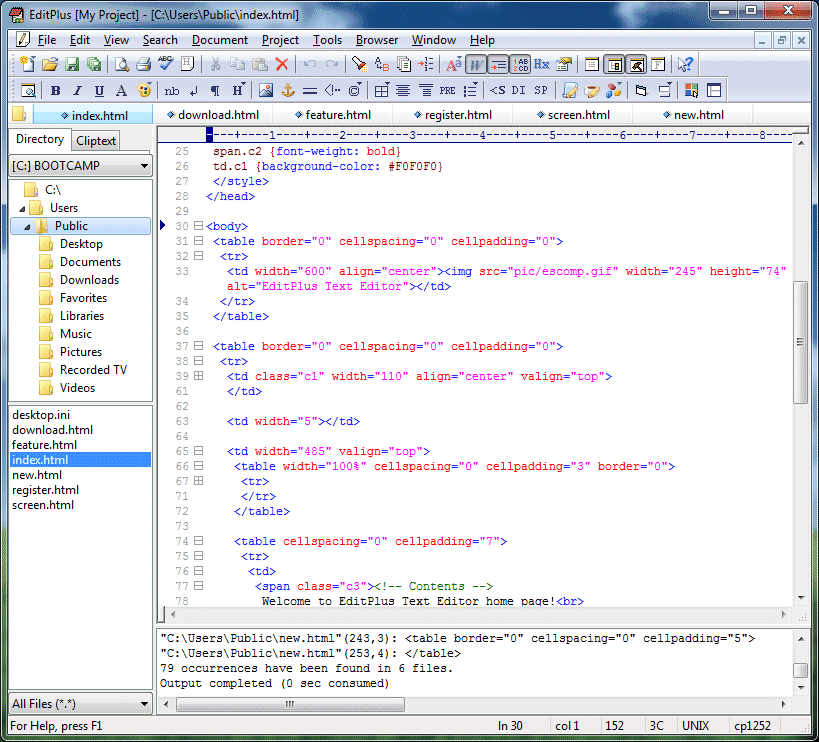
EditPlus Text Editor 3.41 Build 877 Full

EditPlus là phẩn mềm soạn thảo văn bản hỗ trợ cho nhận dạng và làm đổi màu các cấu trúc file HTML, CSS, PHP, ASP, Perl, C/C++, Java, JavaScript và VBSCript. Ngoài ra người dùng có thể tự định nghĩa tập tin cấu trúc theo ý mình.


Tính năng thích hợp trên Internet:


+ Dùng chính EditPlus để làm web browser xem và chỉnh sửa nội dung của tập tin HTML hoặc java applet mà không cần chạy thêm trình browser.
+ Tích hợp sẵn các lệnh FTP để upload tập tin lên FTP hoặc chỉnh sửa trực tiếp tập tin nằm trên FTP server.
+ Làm sáng các URL và địa chỉ email.
+ HTML toolbar: Thêm HTML tags nhanh và dễ từ toolbar này, hỗ trợ cả các tính năng chèn màu, chèn ký tự, tạo bảng table và tạo đối tượng.
+ Chọn tài liệu (Document selector): Chọn văn bản tập tin đã nạp lên bộ nhớ nhanh chóng bằng chuột click . Nhanh hơn chọn trên menu Window hoặc Ctrl-Tab nhiều lần như những phần mềm khác.
+ Tiện ích người dùng (User tools): Hỗ trợ những lệnh cho người dùng tạo như Keystroke recording (lưu và lặp là các trình tự phím nhấn).
+ Tự động hòan tất từ khóa (Auto-completion): Tự động hoàn tất từ khóa đang gõ. Mặc định hỗ trợ cho Perl và C/C++. Người dùng có thể tạo file auto-completion riêng cho những ngôn ngữ lập trình khác.
+ Cửa sổ Cliptext: Lưu lại nhiều cliptext để truy xuất dễ và nhanh.
+ Template: Tạo tập tin mới nhanh hơn nhờ templates.

Home Page: EditPlus - Text Editor, HTML Editor, PHP Editor and Java Editor for Windows

Download:
http://www.mediafire.com/?q2565ka72a58vi2

Source API nạp thẻ VTC

Code được viết thành các class, sử dụng như API, dễ dàng sử dụng form để tích hợp vô code nào đó :).

* Download:

http://www.mediafire.com/?ab47e77i0ii8bjo
Pass: vnhack
* Hướng dẫn:

Quote:
Không cần chỉnh sửa lằng nhằng, upload code lên, sau đó edit index.html, sửa account của bạn tại:

Quote:


Như trong demo đang là vnhack.

Popular Posts